
Why TTS Latency Increases with Longer Responses—and How to Fix It
Imagine asking an AI voice assistant a simple question and hearing the answer almost immediately. Then you ask for a detailed explanation and suddenly there is a noticeable pause before the first word. The voice sounds great, but the conversation feels slow. Why does adding more text create such a noticeable delay?
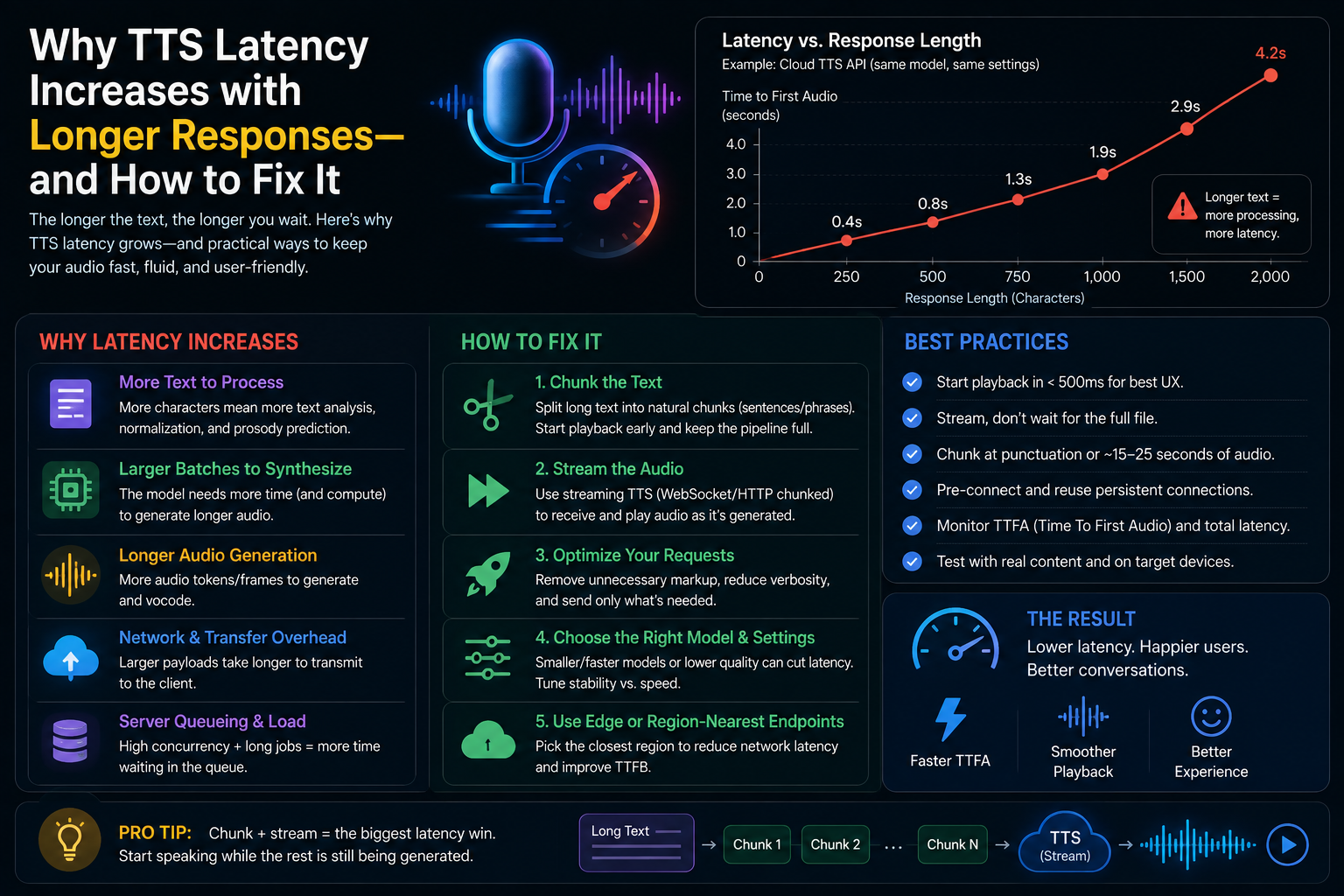
The obvious answer is that more text takes more time to turn into speech. That is true, but it is only part of the story. Modern text-to-speech systems perform text normalization, linguistic analysis, model inference, audio generation, encoding, streaming, and network delivery. Your application can also introduce buffering and connection overhead.
For real-time voice applications, the most important goal is usually not to finish the entire response faster. It is to make the first useful audio arrive sooner.
1. What Actually Happens When Text Becomes Speech?
TTS latency is more than model inference
When your application sends text to a TTS service, the system does not simply convert characters into an audio file in one step. The request normally travels through a network connection, authentication and request handling, text normalization, linguistic processing, model inference, acoustic generation, audio encoding, and delivery back to the client. The player may then buffer some audio before playback starts.
This creates several different latency measurements. Time to first byte measures when the first response data reaches your application. Time to first audio measures when playable speech becomes available. Total generation latency measures how long it takes to produce the complete audio response.
For a conversational voice application, time to first audio is often the most useful metric. A response that takes 2.5 seconds to finish can still feel responsive if speech begins after 200 milliseconds and continues streaming. The same 2.5-second response feels slow if the user hears nothing for 2.2 seconds.
Why longer text changes the equation
Longer input can increase preprocessing and synthesis work. A 20-word response and a 500-word response may use the same voice, but the second request contains many more words, punctuation marks, pronunciation decisions, sentence boundaries, and acoustic frames.
Consider a simple example. At an illustrative speaking rate of 150 words per minute, 150 spoken words represent about 60 seconds of speech. A 450-word response represents about 180 seconds, or three minutes, of speech. Actual duration varies with speaking rate, language, pauses, punctuation, and voice settings, but the engineering principle remains the same: more speech means more audio that eventually has to be generated and transmitted.
Total latency versus perceived latency
Users experience the moment they hear the first useful word. They do not care that your backend finished a large synthesis job 1.5 seconds later. That is why streaming architectures are so important for AI voice applications.
The user experiences the delay before the first sentence, not the amount of compute your backend performs after the conversation has already started.
Companies including Microsoft, ElevenLabs, and Murf document streaming approaches specifically because audio can be delivered while synthesis is still in progress. This changes the user's perception of response speed without requiring every part of the backend to become instantaneous.
| Metric | What it measures | Why it matters |
|---|---|---|
| TTFB | Time until the first response byte | Shows network and server responsiveness |
| Time to first audio | Time until playable speech arrives | Critical for conversational UX |
| Finish latency | Time until all audio is generated | Important for downloadable files |
2. Why Longer Responses Increase TTS Latency
Text preprocessing gets larger
Before speech synthesis begins, the engine has to interpret the input. Text normalization can involve numbers, dates, abbreviations, currencies, symbols, acronyms, and unusual words. A short sentence may contain only one difficult expression. A long answer can contain dozens.
Language can also affect preprocessing. Murf's latency documentation notes that language-specific processing can introduce additional time, with some examples adding roughly 10–20 milliseconds of preprocessing latency. Transliteration scenarios can add further processing as well. These numbers are small compared with a slow network route, but they matter when you are trying to optimize a system for sub-second responsiveness.
The model has more speech to generate
The most obvious factor is synthesis work. More words generally mean more phonemes, timing decisions, acoustic frames, and samples. A 30-second spoken response and a 180-second spoken response do not require the same amount of final audio.
However, this does not mean that the first audio byte must take six times longer. A well-designed streaming model can generate the beginning while later portions are still being processed. The problem becomes much worse when your application waits for the entire response before starting playback.
Prosody and context can matter
Natural speech requires more than correct pronunciation. The system needs to determine pauses, emphasis, rhythm, sentence endings, and transitions between phrases. Some TTS systems can benefit from broader context to make these decisions.
That creates a trade-off. More context can improve continuity and expressiveness, but waiting for too much context can delay the first audio. Real-time systems therefore need to balance linguistic context against startup speed.
Audio encoding and transfer add another layer
Once speech has been generated, the audio still has to reach the client. For example, 24 kHz mono PCM with 16-bit samples requires approximately 48,000 bytes per second before protocol overhead. One minute of raw audio at that setting is approximately 2.88 MB.
Compressed formats can reduce transfer size, which can be useful on slower networks. However, encoding and decoding also introduce processing work. The right format therefore depends on the application's network conditions, playback requirements, and latency target.
TTS latency is a pipeline problem, not simply a model problem. Optimizing only the model can leave large delays elsewhere in your system.
3. Streaming Is the Biggest Fix for Long Responses
Why non-streaming TTS feels slow
Suppose your application generates a 400-word answer. In a traditional non-streaming workflow, the application sends all 400 words to the TTS provider, waits for the service to generate the complete audio file, downloads it, and only then starts playback.
If the entire process takes 3 seconds, the user waits approximately 3 seconds before hearing anything. The backend might be working efficiently, but the interaction still feels slow.
Streaming changes the sequence. Instead of waiting for the final audio file, the server sends audio chunks as they become available. Your application can start playback while the remaining speech is still being generated.
HTTP streaming versus WebSockets
HTTP streaming is useful when the complete text is already available and you want audio to arrive progressively. WebSockets become especially useful when the text itself is arriving incrementally, such as when an LLM generates a response token by token.
ElevenLabs provides WebSocket-based TTS for real-time text input, while Murf documents WebSocket streaming for interactive voice applications. The architectural advantage is straightforward: text does not have to wait for the entire response before speech generation begins.
| Architecture | Text availability | Typical use | Perceived latency |
|---|---|---|---|
| Non-streaming | Complete response | Downloads and finished voiceovers | Usually highest |
| HTTP streaming | Mostly available | Web and application playback | Lower |
| WebSocket streaming | Arrives incrementally | Voice agents and AI conversations | Lowest potential |
What current low-latency models show
Murf currently documents approximately 100 milliseconds time-to-first-audio for its Falcon 2 streaming model. ElevenLabs documents approximately 75 milliseconds inference time for its Flash models. These are vendor-specific measurements under stated conditions, not guarantees for your complete application.
Your end-to-end latency includes network distance, request processing, model execution, audio delivery, buffering, and playback. A model with 75 milliseconds of inference time can still produce a user-visible delay of several hundred milliseconds if the rest of the architecture is inefficient.
4. Chunking Long Responses Without Making Speech Sound Broken
Do not split text at arbitrary character counts
A common optimization is to split a response into fixed-size blocks such as 200 characters. This can reduce individual request sizes, but it can also create unnatural speech. Imagine splitting a sentence immediately after the word "because". The first audio segment ends with an incomplete thought and the second begins with the missing explanation.
For natural speech, use semantic boundaries. Paragraphs, complete sentences, and natural punctuation are usually safer places to divide text. The exact chunk size should be determined through testing with your selected TTS model.
The sentence-first strategy
- Receive the LLM response incrementally.
- Buffer tokens until a complete sentence or safe phrase boundary appears.
- Send the completed chunk to the TTS streaming endpoint.
- Start playback as soon as sufficient audio is available.
- Continue preparing later chunks while earlier audio is playing.
This turns your architecture into a pipeline. While the listener hears sentence one, the application can already be preparing sentence two.
Avoid excessive micro-chunking
There is a point where chunking becomes counterproductive. Sending a separate TTS request for every few words can increase network overhead, request management, model startup costs, and audible discontinuities.
Think of chunking as a balance between startup latency and speech continuity. Very large chunks can delay the first word. Extremely small chunks can make the voice sound fragmented. Complete sentences are often a practical starting point for conversational applications.
Chunk at linguistic boundaries first. Optimize the exact chunk size only after measuring real first-audio latency and listening quality.
5. Network, Region, Model, and Client Bottlenecks
Your server location matters
You can have an extremely fast TTS model and still create a slow application if requests travel unnecessarily long distances. Network round-trip time, routing, congestion, TLS setup, and regional service availability all contribute to end-to-end latency.
Murf currently documents multiple regional destinations for its streaming infrastructure, including India, United States regions, Canada, Japan, Australia, the United Kingdom, and Europe. For an application serving users in India, choosing a suitable nearby region can reduce network delay compared with routing every request through a distant location.
Persistent connections remove repeated setup costs
Opening a new connection for every short TTS request can add DNS lookup, TCP connection establishment, TLS negotiation, and request overhead. Microsoft recommends connection reuse and pre-connection techniques when optimizing speech synthesis latency.
This becomes important in a voice agent. If a conversation contains 20 separate turns, even a small amount of connection overhead repeated 20 times can become noticeable. Persistent HTTP connections or WebSockets can reduce that repeated setup cost.
Model selection is a quality-versus-speed decision
Not every TTS model is optimized for interactive use. Some models prioritize expressive narration, voice quality, or long-form consistency. Others are specifically designed to minimize latency.
ElevenLabs positions Flash models for low-latency applications and documents approximately 75 milliseconds of inference time. Murf documents approximately 100 milliseconds time-to-first-audio for Falcon 2 streaming. These figures show why model selection should be part of latency engineering rather than an afterthought.
| Approach | Documented example | Best fit |
|---|---|---|
| Murf Falcon 2 | About 100 ms first-audio target | Real-time streaming |
| ElevenLabs Flash | About 75 ms inference | Low-latency voice applications |
| Long-form expressive model | Measure on your workload | Narration and production audio |
Client buffering can hide a fast backend
Another common mistake is measuring only the backend. Your server might send the first audio chunk after 150 milliseconds, but the browser could wait for additional data before beginning playback. Excessive buffering protects against network jitter but increases perceived delay.
Measure from request initiation through actual playback. That is the number that represents the user's experience.
6. Real-World Applications: Where TTS Latency Matters Most
Voice assistants and AI agents
Conversational agents are highly sensitive to first-audio latency. If an AI agent waits several seconds after every user turn, the interaction feels more like a traditional IVR system than a natural conversation.
Imagine an AI agent producing a 120-word response. At an illustrative rate of 150 words per minute, the final speech lasts about 48 seconds. Waiting for all 120 words before starting TTS is unnecessary. If the first complete sentence contains 18 words, the system can begin speaking those words while the remaining 102 words are still being generated.
This is the fundamental advantage of streaming LLM output into TTS: computation overlaps instead of happening strictly one stage after another.
Customer support
Customer-support voice systems often benefit from shorter responses. Instead of having TTS read a complete knowledge-base article, the agent can provide a 20–40 word answer and offer to explain further if needed.
This reduces synthesis time and improves the listening experience. Spoken interfaces should generally prioritize the information the user needs immediately rather than reproducing the amount of text that would be acceptable on a webpage.
E-learning and accessibility
Long-form educational content has different requirements. A lesson may contain several thousand words, and first-audio latency is less important than consistent audio, throughput, resumability, and reliable generation.
For these workloads, larger chunks can be more efficient. You can generate and cache sections ahead of playback instead of optimizing every sentence for real-time interaction.
Voice cloning and content creation
For creators using a voice cloning platform such as VoxClone AI, the best latency strategy depends on the workflow.
A creator generating a 10-minute narration may care more about total generation time, voice consistency, and downloadable audio quality. An interactive voice application, by contrast, cares much more about time to first audio and continuous playback.
There is therefore no single configuration that is universally fastest. The correct architecture depends on whether your user is waiting for a file, listening to a live stream, or participating in a conversation.
7. A Practical Optimization Plan for Faster TTS
Step 1: Measure the entire pipeline
Do not immediately change your TTS provider. First measure DNS time, connection time, server processing time, time to first audio, time to playback, and total completion time.
Run at least 20–30 requests for each test scenario. Test short responses such as 20 words, medium responses around 100 words, and long responses around 500 words. Repeat the tests from the same geographic region used by your real customers.
Step 2: Stream audio immediately
If your application currently waits for a complete audio file, move to HTTP streaming or WebSocket-based streaming where supported. Start playback when enough audio is available instead of waiting for the final byte.
Step 3: Stream text into TTS
If an LLM generates the text, do not wait for the entire LLM response. Buffer complete sentences and send them to TTS as soon as they become available.
A strong architecture looks like this: user speech → speech recognition → LLM tokens → sentence buffer → TTS → audio stream → playback.
Each stage can overlap with the next one. That overlap is one of the biggest opportunities for reducing perceived latency.
Step 4: Choose the right model and region
For interactive applications, test low-latency models such as ElevenLabs Flash or Murf Falcon 2 against your actual workload. For long-form narration, compare total throughput, quality, stability, and cost as well as first-audio latency.
Step 5: Cache what does not change
If your application repeatedly speaks the same phrases, cache the generated audio. Greetings, menu instructions, confirmation messages, product names, and common support responses can often be pre-generated.
A cached audio response does not need fresh TTS inference. The remaining delay is primarily the time needed to retrieve and play the audio.
Step 6: Keep spoken responses focused
One of the simplest optimizations is also one of the most overlooked: reduce unnecessary text. If a voice assistant can answer a question in 35 words instead of 250, the system has less text to normalize, synthesize, transmit, and play.
Concise speech is often better UX as well as better engineering. Voice interfaces do not have the same scanning advantage as written interfaces, so a shorter spoken answer can be both faster and easier to understand.
A practical optimization checklist
- Measure first-audio latency.
- Measure actual playback latency.
- Use audio streaming.
- Stream LLM output into TTS.
- Chunk at sentence boundaries.
- Reuse persistent connections.
- Choose infrastructure near your users.
- Test a low-latency model.
- Cache repeated phrases.
- Keep spoken answers concise.
What to expect over the next 2–3 years
Over the next two to three years, TTS is likely to become increasingly integrated with real-time conversational systems rather than being treated as a separate file-generation step.
Faster inference, incremental text input, WebSocket-based pipelines, regional deployments, better interruption handling, and more efficient audio codecs will all contribute to shorter perceived latency. The biggest gains will often come from improving the entire pipeline rather than chasing a single benchmark number.
For example, cutting 100 milliseconds from networking, 100 milliseconds from preprocessing, 150 milliseconds from model startup, and another 100 milliseconds from client buffering can produce a much more responsive application even if no individual component becomes dramatically faster.
The emerging design pattern is clear: text generation and speech generation should behave like one continuous streaming pipeline.
Practical Takeaways
If your TTS becomes noticeably slower as responses get longer, the problem is usually not mysterious. You are probably asking the system to process too much text before allowing playback to begin, or another part of the application pipeline is adding unnecessary delay.
- Longer responses require more linguistic processing and more speech generation.
- Total generation time and perceived latency are different measurements.
- Streaming lets users hear the beginning while the rest is still being generated.
- Sentence-based chunking is safer than arbitrary character splitting.
- WebSockets are particularly useful when text arrives incrementally from an LLM.
- Geographic distance, connection setup, encoding, and buffering can all add latency.
- Low-latency models such as ElevenLabs Flash and Murf Falcon 2 are designed for interactive workloads, with vendor-documented figures around 75–100 milliseconds under their stated measurement conditions.
- Caching repeated audio can eliminate unnecessary TTS generation.
- The best benchmark is your own production workload, measured from request start through actual playback.
For teams building voice applications, platforms such as VoxClone AI fit into the broader shift toward accessible voice generation and voice-driven content workflows. The same engineering principle applies regardless of provider: send less text at once, start synthesis earlier, stream audio continuously, and measure the complete user experience.
Conclusion
Longer TTS responses feel slower because more text can mean more preprocessing, more linguistic decisions, more synthesis work, more audio data, and potentially more buffering. But the biggest mistake is treating the entire response as one blocking operation.
Modern voice applications should behave more like live pipelines. The LLM generates text, the application identifies safe sentence boundaries, TTS begins synthesis, and audio starts playing while later content is still being produced.
With streaming, sensible chunking, persistent connections, regional routing, model selection, caching, and careful measurement, a long answer does not have to feel like a long wait.
The goal is not simply to make TTS faster on a benchmark. The goal is to make the first useful word reach the listener sooner and keep the conversation moving naturally.
Sources and Technical References
Technical figures and recommendations referenced in this article were checked against documentation from Microsoft Azure Speech, ElevenLabs, and Murf. Vendor latency figures can vary by model, region, network conditions, request size, concurrency, and client implementation.
Microsoft Azure Speech latency guidance provides recommendations for lowering speech synthesis latency. ElevenLabs latency optimization guidance documents model and streaming considerations. Murf TTS latency documentation provides streaming and regional latency information.
Hashtags
#AIVoice #TextToSpeech #TTS #VoiceAI #VoiceCloning #AIAgents #SpeechSynthesis #RealTimeAI #ConversationalAI #VoxCloneAI #AIInfrastructure