
The Technology Behind Real-Time AI Voice Conversations
Imagine calling an AI assistant and getting an answer before you have even finished wondering whether it understood you. You speak naturally, pause, interrupt, change your mind, and the system responds without forcing you through a menu or waiting for a long loading screen. That experience feels simple on the surface. Underneath it is a carefully coordinated chain of speech recognition, language understanding, model inference, voice generation, networking, and audio streaming.
Real-time voice AI is not simply a chatbot that has been given a microphone. The system has to understand when you started speaking, what you said, what you meant, when you stopped, and how quickly it should respond. At the same time, it has to produce natural audio fast enough that the conversation still feels like a conversation.
1. What Makes a Voice Conversation Real-Time?
A conversation is a timing problem
In a text chatbot, a few extra seconds may be annoying but acceptable. In a voice conversation, the same delay can make the system feel broken. Human conversation contains tiny gaps, overlaps, interruptions, and changes in tone. A voice agent has to operate inside that rhythm.
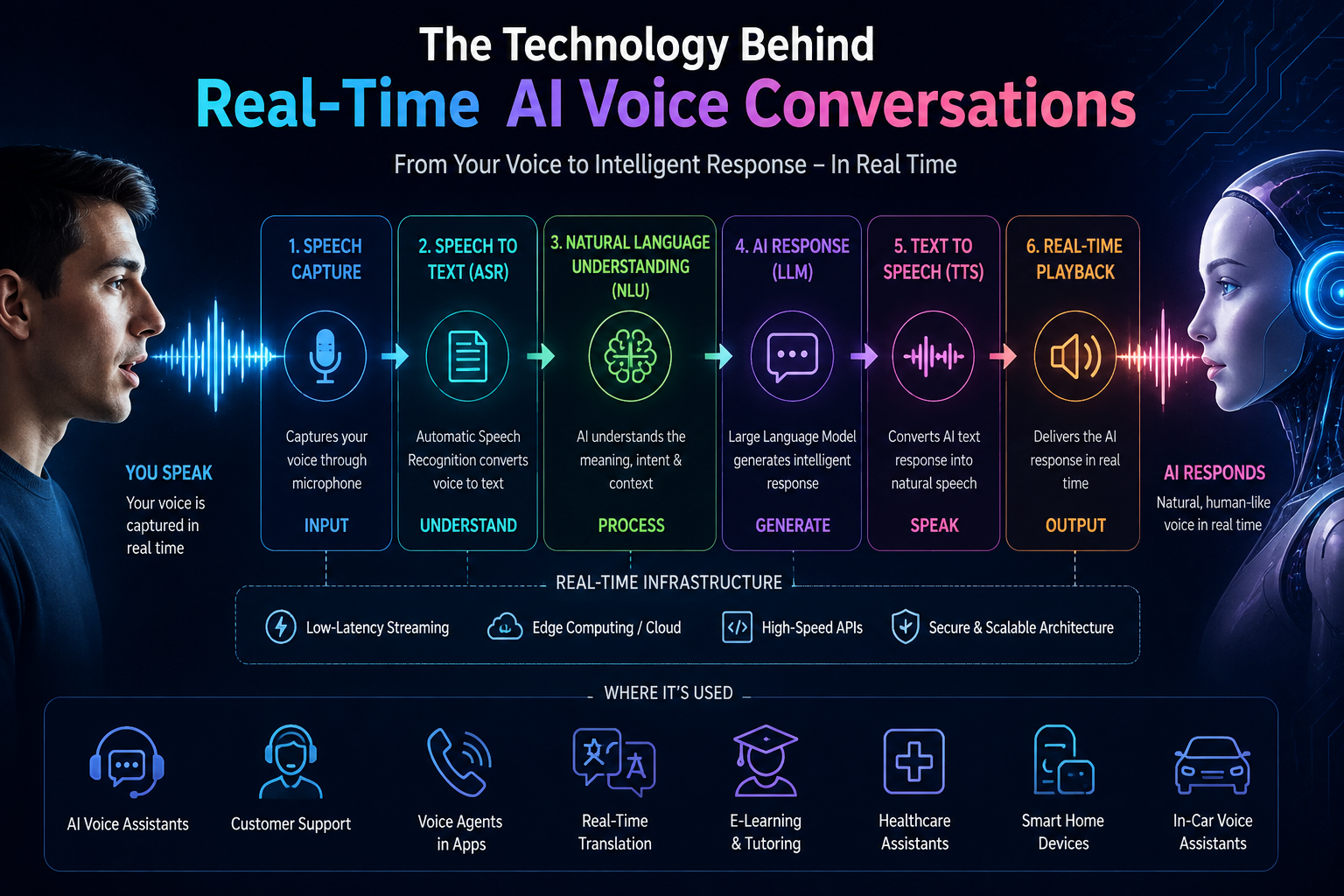
A useful way to think about the pipeline is: microphone → audio stream → automatic speech recognition (ASR) → language model → text-to-speech (TTS) → audio stream → speaker. These stages do not always wait for one another to finish. Modern systems stream partial results, begin generating responses early, and play audio in small chunks.
Latency is more than one number
When people talk about voice latency, they may be describing several different measurements. Network round-trip time, speech endpoint detection, transcription delay, model time-to-first-token, TTS time-to-first-audio, and audio buffering can all contribute to the perceived delay.
| Stage | What happens | Why speed matters |
|---|---|---|
| Audio capture | Microphone collects speech samples. | Slow capture creates an immediate delay. |
| ASR | Speech is converted into text. | The model cannot reason about words it has not received. |
| LLM | Intent and response are generated. | Inference determines how quickly the answer begins. |
| TTS | Text becomes speech. | Audio must arrive quickly and continuously. |
| Playback | Audio is buffered and played. | Too much buffering feels slow; too little can cause gaps. |
Why streaming changes everything
A traditional pipeline might wait for the entire sentence before moving to the next stage. Streaming systems work differently. ASR can emit partial transcripts while a person is speaking. The language model can start processing once enough context is available. TTS can synthesize the beginning of a response while the rest is still being generated.
The goal of real-time voice AI is not merely to produce the correct answer. It is to produce the correct answer at the right moment.
Real-time voice is an orchestration problem as much as it is a model problem. Even an excellent speech model can feel poor if the surrounding system waits too long between stages.
2. Speech Recognition: Turning Your Voice Into Data
The first step is audio, not text
Your microphone does not send words to the AI. It captures changes in air pressure as an audio signal. The system samples that signal, typically represented as digital audio, and sends small chunks to the speech recognition service. A common professional audio rate is 16,000 samples per second for speech processing, although production systems may use other rates depending on the application.
The ASR model then estimates the words represented by the incoming waveform. Modern systems are much better than older speech recognition software at handling accents, background noise, conversational language, and different speaking styles. OpenAI's Whisper, for example, was trained on 680,000 hours of multilingual and multitask supervised data, illustrating how large training datasets can improve general-purpose speech recognition.
Automatic speech recognition in a live conversation
In a real-time agent, transcription is usually incremental. Instead of waiting for a complete recording, the service sends partial hypotheses and later refines them. This matters when you say something such as, “Book me a flight to... actually, make that a train.” A useful system needs to recognize that the later phrase changes the earlier intent.
Voice activity detection is another important piece. The system needs to estimate whether you are speaking, pausing, or finished. If it waits too long, the agent feels sluggish. If it cuts you off too early, the conversation feels unnatural. Good endpoint detection is therefore a product feature, not just an engineering detail.
Accuracy versus speed
| Approach | Advantage | Trade-off |
|---|---|---|
| Batch transcription | Can use full audio context. | Usually adds conversational delay. |
| Streaming ASR | Partial results arrive early. | Early words may be revised. |
| On-device ASR | Can reduce network dependency. | Device compute and model size become constraints. |
Google Cloud Speech-to-Text, Microsoft Azure Speech, Amazon Transcribe, and OpenAI-based speech systems all demonstrate the broader shift toward highly capable speech interfaces. For developers, the practical lesson is straightforward: choose the recognition architecture around the conversation you want to build, not simply the model with the most impressive benchmark.
3. The Intelligence Layer: LLMs and Conversation State
Speech recognition alone is not understanding
Suppose you say, “Can you move my meeting from three to tomorrow morning?” The transcript contains the words, but the system still has to identify the intent, entities, time reference, and action. This is where the language model becomes important.
Large language models can interpret the transcript, maintain conversational context, call tools, and produce a response. OpenAI, Google, Microsoft, and Amazon have all invested heavily in models and cloud infrastructure that can support conversational applications. In a voice system, however, the model is only one part of the loop.
Conversation memory has to be selective
A useful voice agent does not need to repeat the entire conversation to itself every time you speak. It can maintain recent turns, system instructions, tool results, user preferences, and application state. Good state management keeps prompts smaller, reduces unnecessary computation, and makes responses more focused.
Consider a customer-service call. The agent might need the customer's order number, delivery status, payment state, and previous troubleshooting steps. It does not necessarily need every sentence spoken during a 20-minute call. A structured state representation can make the system both faster and easier to control.
Tools make voice agents useful
The strongest voice applications usually connect the model to external actions. A voice agent can check a database, search a knowledge base, create a ticket, schedule an appointment, or retrieve an account balance. The model decides what information or action is needed; deterministic software performs the actual operation.
- Capture and transcribe the user's request.
- Identify the intent and required parameters.
- Call the appropriate tool or service.
- Validate the result.
- Generate a concise spoken response.
The model should decide, but critical business rules should remain enforceable in software. This separation makes voice agents safer and easier to debug.
4. Text-to-Speech: Turning an Answer Into a Natural Voice
Why TTS quality changes the experience
Once the AI has generated a response, text-to-speech converts it into audio. This sounds straightforward until you hear the difference between a technically correct voice and one that feels conversational. Timing, pronunciation, emphasis, pauses, pitch, speaking rate, and sentence rhythm all affect perception.
Modern TTS systems from companies such as ElevenLabs, Microsoft, Google, Amazon Polly, and Murf can generate highly expressive voices. The key improvement is that speech synthesis is no longer limited to simple word-to-sound conversion. Neural models learn patterns of pronunciation and prosody from large speech datasets.
Voice cloning and identity
Voice cloning adds another layer. Instead of selecting a generic voice, a system can learn characteristics of a target speaker from an authorized voice sample. The goal can be consistency, localization, accessibility, or a recognizable brand voice.
This capability also introduces responsibility. A cloned voice can be convincing enough to imitate a real person, so consent, identity verification, disclosure, and appropriate usage controls matter. Platforms such as VoxClone AI fit into this broader category of tools for AI voice cloning and text-to-speech workflows.
Streaming audio instead of waiting for the whole answer
The biggest real-time trick is simple: do not wait for the entire response. If the first sentence is ready, TTS can begin generating it while the language model is still working on later sentences. The audio is then delivered in chunks to the client.
| Voice technology | Typical strength | Best fit |
|---|---|---|
| Standard TTS | Fast, predictable speech. | Apps, notifications, accessibility. |
| Expressive neural TTS | More natural prosody. | Assistants, education, media. |
| Voice cloning | Speaker-specific identity. | Personalized and branded experiences. |
5. The Hidden Engineering: Streaming, Networking, and Turn-Taking
WebRTC, WebSockets, and audio transport
A real-time voice application needs a persistent path for audio and events. WebRTC is widely used for interactive audio and video because it is designed for low-latency communication. WebSockets can also provide a persistent bidirectional channel for audio chunks, transcripts, model events, and application messages.
The choice depends on the product. A browser-based voice agent may use WebRTC for media and an API channel for control events. A telephony system may use a carrier connection or SIP infrastructure. The architecture can vary, but the goal is the same: move small pieces of information continuously rather than treating every turn as a separate file upload.
Barge-in: the feature that makes AI feel less robotic
People interrupt each other. A voice agent should be able to handle that. Barge-in means the user can start speaking while the AI is talking, causing playback to stop and the system to process the new input.
Without barge-in, the user may have to wait until the AI finishes a long sentence. With it, the interaction becomes much closer to normal conversation. Implementing it well requires audio-level detection, cancellation of the current TTS stream, preservation of the new user utterance, and correct conversation-state handling.
A practical latency budget
There is no universal latency number that guarantees a good conversation. Still, engineering teams often think in budgets. For example, a product might target around 100 milliseconds for network transport, a few hundred milliseconds for endpoint detection and ASR, another few hundred milliseconds to start model output, and a similarly tight window for first audio from TTS. These are design targets, not promises, and real-world performance varies by model, region, hardware, network, and workload.
In voice UX, perceived responsiveness often matters more than the raw speed of any individual model.
6. Where Real-Time Voice AI Is Already Useful
Customer service and contact centers
Customer support is one of the clearest applications because conversations already happen by voice. A voice agent can answer frequently asked questions, identify an account, check order information, collect details, summarize a call, or hand a complicated case to a human.
The scale can be significant. The global contact-center market contains millions of human-agent interactions every day, and even a modest reduction in average handling time can translate into substantial operational savings. The important metric is not simply the number of calls automated. Teams should measure containment rate, escalation quality, customer satisfaction, latency, and error rate.
Education, accessibility, and content
Voice AI can turn written content into spoken lessons, provide conversational tutoring, read interfaces aloud, and create multilingual learning experiences. Text-to-speech is particularly useful for people who prefer auditory learning or need accessibility support.
Audiobook production is another obvious example. An AI voice can generate a consistent narration style across long-form content, while human review can be used for pronunciation, pacing, and sensitive material. The technology is most useful when it removes repetitive production work without removing editorial judgment.
Voice agents inside products
A voice interface can also become a feature inside an existing application. Imagine a CRM where a salesperson says, “Show me overdue accounts above $10,000,” or a field-service application where a technician says, “Create a ticket and attach the last inspection result.” The voice layer becomes a faster way to operate software that already exists.
| Use case | Potential benefit | Key metric |
|---|---|---|
| Customer support | 24/7 first-line assistance. | Resolution and escalation rate. |
| Education | Interactive spoken tutoring. | Completion and learning outcomes. |
| Media | Faster narration workflows. | Production time and quality review. |
| Enterprise software | Hands-free commands. | Task completion time. |
7. Challenges, Safety, and the Next Two to Three Years
The hard problems are not disappearing
Real-time voice systems still have difficult edge cases. Background noise can reduce recognition accuracy. Strong accents and code-switching can challenge ASR. Network instability can create gaps. LLMs can misunderstand intent. TTS can mispronounce names. And a system that sounds confident can still give an incorrect answer.
Safety is especially important when the voice agent can perform actions. A support bot that gives an incorrect explanation is one problem. An agent that can transfer money, change account details, or make a binding reservation requires much stronger authorization and verification.
Voice cloning needs stronger consent controls
The same technology that makes personalized voices useful can make impersonation easier. Responsible implementations should document who owns or controls the voice, what permissions were granted, how the voice can be used, and how misuse can be reported. Organizations should also consider disclosure when an interaction is AI-generated.
For developers, practical safeguards include authenticated voice-creation workflows, access controls, audit logs, rate limits, watermarking or provenance mechanisms where appropriate, and clear terms for authorized voices.
What to expect by 2028–2029
Over the next two to three years, the most visible improvements are likely to come from tighter integration rather than one magical model. Voice agents should become better at interruption, multilingual conversation, tool use, memory, and context awareness. More processing may move closer to the device for privacy and responsiveness, while cloud models continue handling tasks that need greater reasoning capacity.
We should also see voice becoming less of a standalone feature. Instead of opening a dedicated voice assistant, users may speak naturally inside browsers, cars, customer portals, productivity software, education platforms, and business applications.
- Lower latency: systems will increasingly stream input and output through every stage.
- Better multimodality: voice agents will combine speech with screens, images, documents, and live application state.
- More specialized agents: companies will build voice systems around specific workflows instead of generic conversation alone.
- Stronger identity controls: consent, provenance, and anti-impersonation measures will become more important as synthetic voices become harder to distinguish from recordings.
8. Practical Takeaways for Building a Real-Time Voice System
Start with the conversation, not the model
Before choosing a speech API or language model, write down what the user should be able to accomplish. A voice agent for booking appointments has different requirements from a voice tutor or a call-center assistant.
- Define the task: identify the exact actions the user needs to complete by voice.
- Design the turn-taking: decide how the system detects pauses, interruptions, confirmations, and corrections.
- Choose ASR: test real user speech, including accents, noise, names, and domain terminology.
- Choose the intelligence layer: use an LLM or specialized model that fits the required reasoning and tool-calling workload.
- Choose TTS: compare pronunciation, latency, voice quality, language support, and licensing.
- Stream everything possible: avoid unnecessary file uploads and sequential waiting.
- Measure the full loop: track time-to-first-response, interruption success, transcription accuracy, task success, and user satisfaction.
A simple architecture to remember
If you are new to voice engineering, keep the architecture simple at first:
User voice → streaming audio → ASR → conversation state + LLM → tools when needed → streaming TTS → user hears response
Once that works, improve one bottleneck at a time. Do not optimize everything simultaneously. Measure where the delay actually occurs, then reduce that stage's contribution to the total experience.
The numbers worth watching
A practical voice dashboard can include at least these measurements:
| Metric | What it tells you |
|---|---|
| Time to first audio | How quickly the user hears the response. |
| End-to-end latency | Total delay from user speech ending to AI response starting. |
| ASR error rate | How often speech is transcribed incorrectly. |
| Barge-in success | Whether interruptions are detected and handled correctly. |
| Task success | Whether the user actually achieved the intended outcome. |
| Escalation rate | How often a human or fallback workflow is needed. |
The biggest lesson is that voice quality cannot be judged from a TTS demo alone. A beautiful synthetic voice inside a slow, forgetful, interruption-prone agent will still feel poor. Conversely, a slightly less expressive voice can work extremely well when the system understands intent quickly and responds at the right moment.
Conclusion: Voice AI Is Becoming a Conversation Interface
Real-time AI voice conversations are the result of several technologies working as one system. Speech recognition turns audio into language. The language model interprets the request and generates the next step. Tools connect that intelligence to real applications. Text-to-speech turns the response back into sound. Streaming infrastructure keeps the entire loop fast enough to feel interactive.
The most important shift is not simply that computers can talk. It is that software can increasingly listen, reason, act, and speak within the same interaction. That opens the door to voice interfaces that are useful inside customer support, education, accessibility, productivity, media, and everyday applications.
If you understand the pipeline, you understand the foundation of modern voice AI. The next generation will be defined by how well these components work together: lower latency, better context, natural turn-taking, safer tool use, and more responsible voice identity.
For teams exploring voice cloning and AI speech creation, VoxClone AI is one example of how voice generation technology is becoming accessible to creators and developers. The technology will continue changing quickly, but the core principle will remain the same: the best voice experience is the one that helps people communicate with software more naturally and with less friction.
Key Statistics and Technology Facts
- Human speech is commonly sampled at 16,000 samples per second in many speech-processing systems.
- OpenAI reported that Whisper was trained on 680,000 hours of multilingual and multitask supervised data.
- A standard digital audio CD uses a 44.1 kHz sample rate, or 44,100 samples per second.
- Speech is often represented with 16-bit PCM audio in common application pipelines.
- A 16 kHz, 16-bit, mono PCM stream uses about 32,000 bytes per second before transport overhead.
- One minute of uncompressed 16 kHz, 16-bit, mono PCM audio is roughly 1.92 MB.
- The human conversational pause can be measured in hundreds of milliseconds, making sub-second system responsiveness important for natural turn-taking.
- WebRTC is designed for real-time communication and is widely used for interactive audio and video applications.
- Amazon Polly supports dozens of languages and variants, showing how TTS has expanded beyond a small set of English voices.
- Google Cloud Speech-to-Text supports many languages and language variants for speech recognition workloads.
- Microsoft Azure Speech provides speech recognition, synthesis, translation, and related voice capabilities through cloud APIs.
- A real-time pipeline can contain 5 or more latency-sensitive stages: capture, ASR, reasoning, TTS, and playback, plus network transport.
Hashtags
#VoiceAI #AI #ArtificialIntelligence #VoiceCloning #TextToSpeech #SpeechRecognition #AIAgents #ConversationalAI #LLM #GenerativeAI #TTS #VoxCloneAI