Best Free AI Voice Cloning App With Text-to-Speech and Speech-to-Text Features
Imagine recording a 60-second audio clip and, within minutes, having an AI that speaks in your exact voice, your tone, your rhythm, your personality. No studio. No expensive equipment. Just your phone and an app. That is no longer science fiction. That is exactly what the latest generation of AI voice cloning apps can do, and millions of creators, educators, and businesses are already using them every single day.
Whether you are a content creator looking to produce voiceovers at scale, a developer building voice-enabled products, or simply someone curious about what AI can do with your voice, the right app changes everything. The problem is that most people do not know which app actually delivers on its promises, especially when it comes to combining three critical features in one place: voice cloning, text-to-speech (TTS), and speech-to-text (STT).
This guide cuts through the noise. We look at what makes a great AI voice app, what the numbers say about where this technology is headed, and why VoxClone AI stands out as a genuinely capable free option available right now on Android.
The Real State of AI Voice Technology in 2026
The AI voice market has grown faster than almost anyone predicted. According to Grand View Research, the global voice cloning market was valued at $2.1 billion in 2024 and is on track to reach $7.8 billion by 2030, growing at a compound annual growth rate of nearly 24%. That is not hype. That is investment dollars, developer hours, and user adoption numbers telling a consistent story.
Text-to-speech technology alone now processes an estimated over 10 billion characters of text per day across major platforms including Google Cloud Text-to-Speech, Amazon Polly, and Microsoft Azure Cognitive Services. The quality gap between human narration and AI narration has shrunk to the point where, in blind listening tests conducted by researchers at Carnegie Mellon University in 2024, listeners correctly identified the AI voice only 52% of the time, barely better than random chance.
Why Mobile-First Matters Now
The shift to mobile is not a trend. It is the reality. As of early 2026, more than 68% of AI tool users access these services primarily on a smartphone. For creators in emerging markets, particularly across South Asia, Southeast Asia, and Sub-Saharan Africa, a mobile app is not a convenience. It is the only viable access point. This is why apps available on the Google Play Store with a genuinely free tier carry so much weight in this space.
Three Features That Define a Complete Voice AI App
Not all voice apps are built equal. The ones that actually solve real problems for real users tend to do three things well:
- Voice Cloning: Training a custom AI model on a user's voice from short audio samples.
- Text-to-Speech (TTS): Converting written content into natural, expressive spoken audio.
- Speech-to-Text (STT): Accurately transcribing spoken audio into editable, searchable text.
When these three live in one app, your workflow transforms. You record a meeting with STT, turn the transcript into a polished script, then generate a voiceover using TTS or your own cloned voice. That full loop, without switching tools, is what serious users actually want.
"The best AI voice tool is the one that removes friction from your creative process, not one that adds more steps to it."
What Makes AI Voice Cloning Work
Voice cloning sounds almost magical, but the engineering behind it is grounded in well-understood machine learning principles. At its core, a voice cloning system does two things: it analyzes the acoustic characteristics of a person's voice (pitch, cadence, timbre, speaking style) and it trains a neural network to reproduce those characteristics when generating new speech from text input.
The Role of Neural Waveform Models
Modern voice cloning relies heavily on neural waveform synthesis, a technique pioneered and popularized by systems like Google's WaveNet and later refined by companies including ElevenLabs and OpenAI with their Voice Engine. These models do not stitch together pre-recorded audio clips. They generate entirely new waveforms, sample by sample, based on the patterns they learned from your voice. The result is speech that carries your natural hesitations, your breath patterns, and your characteristic intonation.
The training data requirement has dropped dramatically. Early commercial systems from 2020 and 2021 needed 10 to 30 minutes of clean audio to produce a usable clone. By 2025, leading systems like ElevenLabs and VoxClone AI could produce a recognizable clone from as little as 30 to 60 seconds of audio. That reduction in data requirement is what made consumer-grade voice cloning genuinely practical.
Speaker Embeddings and What They Mean for Quality
The technical term for the mathematical representation of a voice is a speaker embedding. Think of it as a fingerprint of your vocal identity, captured as a vector of numbers. When you submit audio to a cloning app, the system extracts this embedding and uses it to condition the speech synthesis model. The higher the quality of your input audio and the cleaner the recording environment, the more accurate and lifelike your cloned voice will be.
This is why most good apps ask you to record in a quiet room, speak clearly, and avoid background noise. It is not an arbitrary requirement. It is the difference between a clone that sounds like you and one that sounds like a poor phone recording of someone else.
Language and Accent Handling
One area where apps diverge sharply is multilingual support. English-only systems are becoming a liability. A platform that handles Hindi, Spanish, Mandarin, Arabic, and Portuguese alongside English opens up use cases that simply do not exist otherwise. Companies like Microsoft Azure now support over 140 languages and locales in their neural TTS service. For users in multilingual markets, this capability is not optional. It is a baseline requirement.
Text-to-Speech in 2026: Quality, Speed, and Naturalness
Text-to-speech has undergone a quiet revolution. The robotic, flat-sounding voices that used to be the norm have been replaced by systems capable of expressing emotion, adjusting pacing, emphasizing key words, and even simulating conversational dynamics like pausing or laughing. The difference between a 2018 TTS output and a 2026 one is jarring. One sounds like a GPS unit reading directions. The other sounds like a person.
The Key Quality Metrics That Matter
When evaluating TTS quality, three metrics come up repeatedly in research literature:
- Mean Opinion Score (MOS): A human-rated scale from 1 to 5 measuring perceived naturalness. Top systems in 2025 consistently score above 4.2, approaching the human baseline of roughly 4.5.
- Word Error Rate (WER): How often the TTS system mispronounces or distorts words. Leading platforms now achieve WER below 2% on standard English text.
- Latency: Time from text input to audio output. For real-time applications, latency under 300 milliseconds is the target. Cloud-based TTS from Amazon Polly and Google Cloud typically delivers in 100 to 200 milliseconds for short inputs.
Voice Styles and Emotional Range
Modern TTS platforms now offer distinct voice styles that go well beyond gender and age. You can select from conversational, newscast, customer service, narration, cheerful, empathetic, and a range of other styles. Microsoft Azure Neural TTS offers over 400 neural voices across more than 140 languages, with style controls that let developers fine-tune delivery for specific contexts. Murf AI has built a commercial product specifically around these style controls for professional voiceover creators.
What Free TTS Actually Offers vs. What You Pay For
| Feature | Free Tier (Typical) | Paid Tier (Typical) |
|---|---|---|
| Monthly character limit | 10,000 to 50,000 | 500,000 to unlimited |
| Voice cloning slots | 1 to 3 | 10 to unlimited |
| Audio download quality | Standard (MP3 128kbps) | High (WAV / MP3 320kbps) |
| STT transcription minutes | 30 to 60 min/month | 600+ min/month |
| Commercial use rights | Limited or restricted | Full commercial license |
Speech-to-Text: The Underrated Half of the Voice AI Stack
Speech-to-text often plays second fiddle to voice cloning in product marketing, but for many real-world workflows, it is actually the feature that gets used every day. Meeting transcriptions, interview notes, podcast show notes, accessibility captions, customer call logs. The use cases for accurate, fast STT are enormous and growing.
Where STT Accuracy Stands Today
OpenAI's Whisper model, released in 2022 and continuously improved since, set a new benchmark for open-source STT accuracy. On standard English speech, Whisper's large model achieves a word error rate of approximately 2.7%, which is competitive with many commercial offerings. Google's Speech-to-Text API reports similar accuracy figures, with the caveat that performance drops more significantly on accented speech, domain-specific vocabulary, and background noise.
The real-world accuracy numbers matter because they determine whether you can use an STT output directly or whether you spend 30 minutes correcting errors for every hour of audio transcribed. At a WER below 5%, most users find the output usable with light editing. Above 10%, the time savings often disappear.
Real-Time STT vs. Batch Processing
Two fundamentally different modes exist for speech-to-text processing. Real-time STT transcribes as you speak, with results appearing within milliseconds. This mode is used for live captions, voice commands, and real-time note-taking. Batch processing transcribes a complete audio file after the fact, typically with higher accuracy because the model has access to the full audio context.
For most app users, batch processing is the day-to-day reality: upload a recording, get a transcript. The distinction matters when you are evaluating an app's feature set and trying to understand whether its STT is suited to your specific workflow.
Multilingual STT and Why It Is a Competitive Differentiator
English dominates AI benchmarks, but it represents only a fraction of global voice AI usage. Whisper supports transcription in 99 languages. Google's STT API supports over 130 languages and dialects. For apps targeting users in India, where over 22 scheduled languages are officially recognized and hundreds more are spoken regionally, multilingual STT is not a nice-to-have. It is essential.
How Top AI Voice Apps Compare
The market for AI voice apps is crowded. ElevenLabs, Murf AI, Resemble AI, Play.ht, Speechify, and a growing number of newer entrants all compete for attention. The differences between them are real and consequential, particularly when you are trying to find something genuinely free that does not sacrifice quality.
| App / Platform | Voice Cloning | TTS | STT | Free Tier | Mobile App |
|---|---|---|---|---|---|
| VoxClone AI | Yes | Yes | Yes | Yes (generous) | Android |
| ElevenLabs | Yes | Yes | Limited | Yes (10k chars/mo) | Web only |
| Murf AI | Yes (paid) | Yes | No | Limited trial | Web only |
| Play.ht | Yes (paid) | Yes | No | Limited | Web only |
| Resemble AI | Yes | Yes | No | Pay-per-use | Web only |
The pattern above tells an important story. Most of the well-known players are web-only, have limited or no STT integration, and restrict their voice cloning features behind paid plans. VoxClone AI is one of the few that brings all three capabilities together in a mobile-native format with a free entry point.
The Case for an Integrated Platform
Switching between three different tools adds friction, increases cost, and breaks your workflow. If you are transcribing audio with one service, writing scripts in a text editor, and generating voiceovers with another service, you are spending cognitive energy on tool management rather than on the actual work. An integrated platform solves this. Every step lives in one place, data passes seamlessly between features, and your learning curve applies to one interface instead of three.
Real-World Use Cases and Who Benefits Most
AI voice apps are not a single-audience product. The same technology that helps a YouTuber produce a voiceover also helps a teacher create accessible course materials, a business owner record professional customer service prompts, and a developer prototype a voice interface. Let us look at the specific use cases where this combination of features delivers the most value.
Content Creators and YouTubers
Video content demands audio. Most creators either hire voice talent (expensive), record themselves every time (time-consuming), or use generic stock voices (recognizable and impersonal). Voice cloning changes this calculation entirely. A creator can clone their own voice once, then generate voiceovers for dozens of videos without sitting behind a microphone. According to a 2024 survey by Creator Economy Report, 41% of full-time content creators reported using some form of AI voice tool in their production workflow, up from just 9% in 2022.
Corporate Training and eLearning
The eLearning market was valued at $399.3 billion in 2022 and continues to grow at over 14% annually (Global Market Insights, 2024). Producing narrated training modules is one of the largest line items in corporate L and D budgets, often because of the cost of professional voice-over talent. AI TTS with voice cloning cuts that cost dramatically while allowing rapid content updates. When a process changes and 40 slides need new narration, regenerating the audio takes minutes instead of scheduling a recording session.
Accessibility Applications
For people with visual impairments, reading difficulties, or conditions like dyslexia, text-to-speech is not a productivity tool. It is an accessibility requirement. The World Health Organization estimates that over 2.2 billion people worldwide have a near or distance vision impairment. High-quality, natural-sounding TTS makes digital content accessible in a way that older synthesized voices never could. STT similarly opens up written communication for people who find typing difficult or impossible.
Podcasters and Audio Journalists
Transcription has been a podcasting pain point for years. Services like Rev and Otter.ai have helped, but they add another subscription to manage. Having STT built into the same app where you edit and produce audio is a genuine quality-of-life improvement. Podcasters can transcribe episodes for show notes and accessibility, generate highlight clips using TTS, and maintain consistent audio quality across episodes even when recording conditions vary.
VoxClone AI: A Free App That Gets the Fundamentals Right
Among the growing number of options in this space, VoxClone AI has built a product that addresses the specific gaps most users run into: the need for all three features in one place, on a mobile device, without a mandatory subscription.
The app is available now on Android via the Google Play Store. If you are ready to get started, you can download it directly here:
Voice Cloning That Works on a Phone
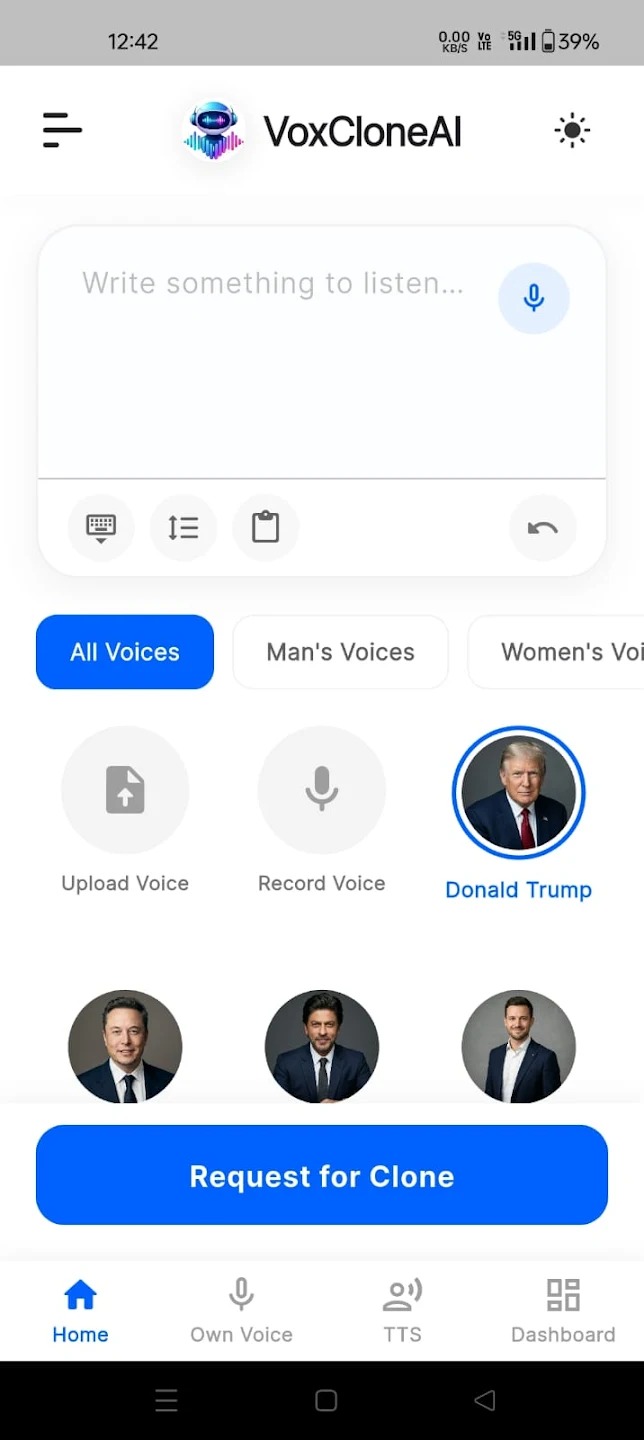
The cloning workflow in VoxClone AI is designed for real people, not just technically sophisticated users. You record a short audio sample directly in the app, the system processes it and creates your voice model, and from that point on you can generate speech in your voice from any text you type. The interface does not assume you have a recording studio. It works with what you have: your phone, a quiet room, and your own voice.
Text-to-Speech With Usable Output Quality
The TTS engine produces audio that is genuinely usable for content creation. Pacing feels natural, pronunciation is accurate across common vocabulary, and the cloned voices maintain enough of the original speaker's characteristics to sound personal rather than generic. For creators who need to produce consistent voiceovers quickly, this quality level removes the most significant bottleneck in the workflow.
Speech-to-Text Built Into the Same Interface
The STT feature means you can record something, transcribe it, edit the transcript as a script, and generate a polished audio output using your cloned voice, all without leaving the app. That is the integrated workflow that used to require three separate subscriptions. For users producing content at volume, the time savings add up quickly.
Challenges, Ethical Considerations, and Responsible Use
No honest discussion of voice cloning technology is complete without addressing the legitimate concerns around misuse. The same capabilities that make these tools powerful for creators also create real risks if used irresponsibly.
Deepfake Audio and Consent
Cloning someone's voice without their consent is not just ethically wrong. In many jurisdictions, it is illegal. Countries including the United States, Germany, and India have existing laws around impersonation, fraud, and unauthorized use of a person's likeness that apply to voice cloning. Several US states passed specific AI voice fraud legislation in 2024 and 2025. Responsible platforms build consent verification into their onboarding and prohibit cloning of voices the user does not own.
"Voice cloning is a powerful tool. Like any powerful tool, the outcomes depend entirely on the intentions and judgment of the person using it. Platforms that take this seriously build safeguards in from the start."
Audio Authentication and Detection
As cloned audio becomes more convincing, the demand for detection tools grows alongside it. Organizations like the Content Authenticity Initiative (CAI), backed by Adobe, Microsoft, and others, are working on provenance standards that attach verifiable metadata to audio files indicating how and where they were created. This kind of infrastructure takes time to mature but represents the industry's attempt to stay ahead of misuse at scale.
Technical Limitations Still Worth Knowing
Even the best voice cloning systems have limits. Emotional range beyond what was captured in the training audio is difficult to reproduce accurately. Very short training samples (under 30 seconds) produce clones that capture general voice character but miss finer nuances. Background noise in the source audio degrades output quality noticeably. For most everyday use cases, none of these limitations are dealbreakers. For high-stakes professional audio production, they are worth understanding in advance.
What the Next Two to Three Years Look Like
The pace of development in AI voice technology makes two-year predictions feel almost conservative. But based on where the research is heading and what major players are building, several trends seem close to inevitable.
On-Device Processing and Privacy
One of the biggest shifts underway is the move from cloud-only to on-device AI processing. Apple's on-device processing commitments, Google's Gemini Nano deployment on Pixel devices, and the broader trend toward edge AI all point toward a future where voice cloning and TTS models run entirely on your phone without sending data to a server. This matters enormously for privacy-sensitive users and for functionality in low-connectivity environments.
Real-Time Voice Conversion in Live Settings
The next frontier is real-time voice cloning, transforming your voice into a target voice during a live call or stream, with latency low enough that the conversion is imperceptible. Systems capable of this existed in research environments by 2024. Commercial deployment at consumer scale is expected to become mainstream between 2026 and 2028. The applications range from gaming and entertainment to privacy-protecting communication tools.
Multimodal Voice AI
Voice AI is increasingly merging with other modalities. Systems that can process an image and generate a spoken description, or that combine STT input with visual context to produce more accurate transcripts, represent the next generation of integrated AI tools. OpenAI's GPT-4o already demonstrated this convergence. As these capabilities filter down into consumer apps, the distinction between a voice app, a visual AI tool, and a general-purpose assistant will blur significantly.
| Trend | Current State (2026) | Expected by 2028 |
|---|---|---|
| Clone training time | 30 to 60 seconds of audio | Under 10 seconds |
| On-device TTS quality | Functional but limited styles | Near cloud-quality output |
| Real-time voice conversion | Research stage, limited demos | Consumer apps mainstream |
| Multilingual clone accuracy | Strong for top 20 languages | High accuracy for 100+ languages |
| AI voice detection tools | Patchy commercial availability | Standardized, widely deployed |
Practical Takeaways: Getting Started the Right Way
Reading about AI voice technology is useful. Actually using it is how you figure out what works for your specific situation. Here are the concrete steps that give you the best starting point.
Step-by-Step: Your First Voice Clone
- Download the app from the Google Play Store and create a free account.
- Find a quiet space. Background noise is the single biggest enemy of clone quality. A room with soft furnishings (couch, carpet, curtains) reduces echo and ambient noise significantly.
- Record your sample. Speak naturally, at your normal pace. Avoid whispering or exaggerating your pronunciation. The AI needs to learn your actual voice, not a performed version of it.
- Review the clone output. Generate a short test phrase and listen critically. Does it sound like you? If not, try a second recording in slightly different conditions.
- Start with a real use case. Do not just experiment. Pick something you actually need: a voiceover for a video, a recorded message, a transcription of a meeting. Real use cases reveal real strengths and limitations faster than test runs.
- Explore the STT feature. Upload or record an audio clip and run the transcription. Check accuracy against the source. This gives you a clear benchmark for your specific accent and speaking style.
How to Get the Best Audio Quality From Any App
Regardless of which app you use, these principles improve your output quality across the board. Record at the highest sample rate your device supports. Keep your phone 20 to 30 centimeters from your mouth during sample recording. Avoid recording near HVAC vents, windows, or in rooms with significant echo. If you are using headphone microphones, test them first: some compress audio in ways that degrade clone quality. And always listen back to your TTS output before publishing. Proper nouns, technical terms, and unusual spellings sometimes trip up even very good TTS systems.
Conclusion
AI voice technology has moved well past the proof-of-concept phase. Voice cloning, text-to-speech, and speech-to-text are mature enough to be genuinely useful in everyday workflows, and the gap between free tools and expensive professional services has narrowed significantly. The market data, the technical benchmarks, and the adoption numbers all point in the same direction: this is a category of tools that is becoming part of standard creative and professional practice, not a niche technology for specialists.
What matters most when choosing an app is fit for your actual workflow. If you need all three features, on mobile, without an immediate subscription commitment, the options are more limited than the marketing noise suggests. VoxClone AI addresses that gap with a free, Android-native app that handles voice cloning, TTS, and STT in one place. Whether you are producing content, building accessibility tools, or simply curious about what your cloned voice sounds like speaking a script you wrote, the starting point is the same: download the app from the Google Play Store and try it with a real use case.
The technology is ready. The question is just whether you are going to put it to work.
#AIVoiceCloning #TextToSpeech #SpeechToText #VoxCloneAI #VoiceAI #AIApp #FreeAITools #AndroidApp #ContentCreation #VoiceOver #AITechnology #GooglePlayStore